What is a system-versioned temporal table?
An audit trail is a chronological record of all database transactions, including insertions, updates, and deletions. It captures both the old and new values of modified data, as well as metadata such as the user or application responsible for the change, the date and time of the change, and the type of change (e.g., insert, update, delete).An audit trail can be used to track and monitor database activity, identify and troubleshoot issues, and ensure data integrity and security. For example, if a user accidentally deletes important data from the database, the audit trail can be used to identify the responsible user and restore the deleted data. Similarly, if data is corrupted or modified in an unauthorized manner, the audit trail can help to identify the cause and take corrective action.

This SQL code creates an audit table called “employees_audit” and a trigger called “audit_employee_changes”. The trigger is activated whenever a row is inserted, updated, or deleted in the “employees” table.
This was before SQL Server 2016. If you are now using SQL 2016 or above, you can simply create and audit trail for any table using “System-Versioned Temporal Table“
What is a system-versioned temporal table?
A system-versioned temporal table is a type of user table designed to keep a full history of data changes, allowing easy point-in-time analysis. This type of temporal table is referred to as a system-versioned temporal table because the period of validity for each row is managed by the system (that is, the database engine).
How does temporal work?
System-versioning for a table is implemented as a pair of tables, a current table and a history table. Within each of these tables, two additional datetime2 columns are used to define the period of validity for each row:
- Period start column: The system records the start time for the row in this column, typically denoted as the
ValidFromcolumn. - Period end column: The system records the end time for the row in this column, typically denoted as the
ValidTocolumn.
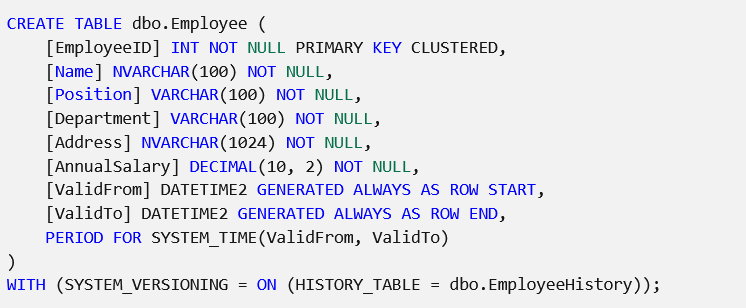
Simply add the dates columns and apply the System_Versioning and the audit trail will work like magic.
In case you want to apply this to an existing table, apply the below script:
ALTER TABLE dbo.Employees
ADD SysStartTime DATETIME2,
SysEndTime DATETIME2
GO
UPDATE dbo.Employees SET SysStartTime = ‘19000101 00:00:00.0000000’, SysEndTime = ‘99991231 23:59:59.9999999’
GO
ALTER TABLE Employees
ALTER COLUMN SysStartTime DATETIME2 NOT NULL
GO
ALTER TABLE Employees
ALTER COLUMN SysEndTime DATETIME2 NOT NULL
GO
ALTER TABLE dbo.Employees
ADD PERIOD FOR SYSTEM_TIME (SysStartTime, SysEndTime)
ALTER TABLE dbo.Employees
SET(SYSTEM_VERSIONING = ON (HISTORY_TABLE = dbo.UsersHistory, DATA_CONSISTENCY_CHECK = ON))
GO
In case you want to disable the audit trail, simply apply the below script:
ALTER TABLE dbo.Tasks SET (SYSTEM_VERSIONING = OFF);
More references on SQL Temporal Tables:
 Suha's Blog